Zapier Integration
Fetchify is available directly on Zapier as Address Auto-Complete by Fetchify. No CLI tools or developer setup is required — you can connect it to thousands of apps straight from your Zapier account.
Before You Start
You will need:
- A Fetchify account with an active access token — sign up for a free trial
- A Zapier account (free or paid)
Available Action
Validate & Autocomplete Address — Best Match
This action takes an address search query and returns the single best matching address with full structured details. It is designed to be used as a step inside a Zap, taking address input from a previous step (such as a form submission or CRM record) and outputting a verified, standardised address.
Inputs
| Field | Required | Description |
|---|---|---|
| Fetchify Access Token | Yes | Your Fetchify API key, found in your account dashboard |
| Address Search Query | Yes | A partial or full address string, for example 10 Downing Street or SW1A 2AA |
| Country Code | Yes | A 2 or 3 character country code. For example gb or gbr for the United Kingdom, us or usa for the United States, de or deu for Germany. Case insensitive. Defaults to gbr |
| Exclude PO Boxes | No | Set to true to exclude post office box addresses from results. Supported for UK, US, and Canada |
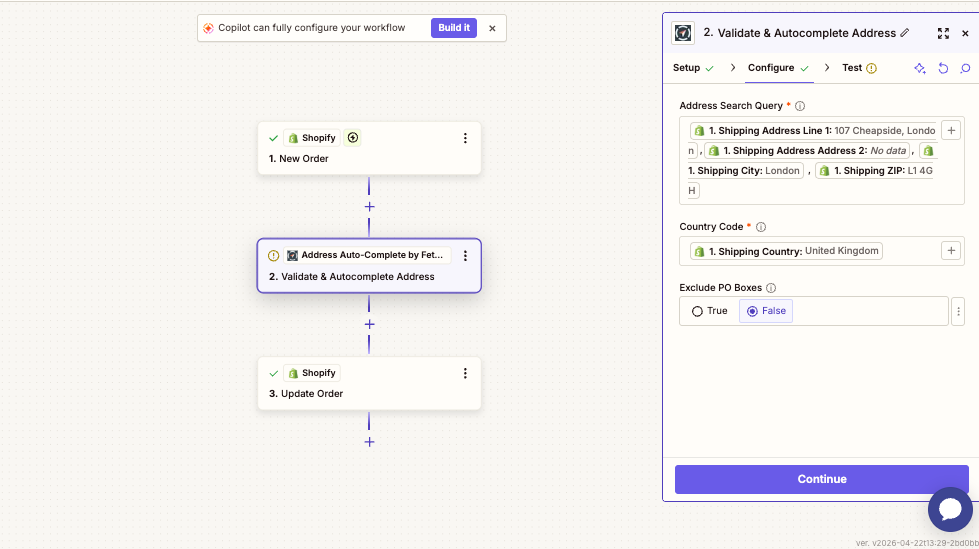
Example of how address input fields can be mapped into the Address Search Query:
Outputs
The action returns the top matching address with the following fields:
Core Address
| Field | Description | Example |
|---|---|---|
Full Address | Complete formatted address as a single string | 27 Gradwell End, South Chailey, Lewes, BN8 4PX, United Kingdom |
Matched Address | Address text matched by the search | 27 Gradwell End, South Chailey, Lewes |
Address Line 1 | First line of the address | 27 Gradwell End |
Address Line 2 | Second line | South Chailey |
Postal Code | Postcode or ZIP code | BN8 4PX |
Locality | Town or city | Lewes |
Country | Full country name | United Kingdom |
Country Code | The country code used in the search | gbr |
Building & Street Details
| Field | Description | Example |
|---|---|---|
Building Number | House or building number | 27 |
Building Name | Building name if applicable | |
Sub Building Name | Flat or apartment name | |
Unit Name | Unit identifier | |
Level Name | Floor or level | |
Street Name | Street name | Gradwell |
Street Prefix | Street prefix | |
Street Suffix | Street suffix | End |
Dependent Street Name | Secondary street name | |
Company Name | Company name if a business address | |
Department Name | Department within a company |
Administrative & Regional
| Field | Description | Example |
|---|---|---|
Dependent Locality | Sub-locality or district | South Chailey |
Administrative Area | Country or region within country | England |
Province Name | County or state name | East Sussex |
Province Code | Abbreviated county or state | E Sussex |
Alternative Province | Alternative province name | Sussex |
Status Fields
| Field | Description |
|---|---|
Success | true if a matching address was found, false if no match |
Original Search Query | The search query that was passed in |
Address ID | Internal Fetchify address identifier |
Address Type | Classification of the address, for example Small User Residential |
Example Workflow
- A customer submits an order form containing an address field
- A Zap triggers on the new form submission
- The Validate & Autocomplete Address action receives the address field as the Search Query, with the appropriate country code
- Fetchify returns the verified, structured address
- A subsequent step in the Zap maps the structured fields (line 1, postal code, etc.) into your CRM, database, or order system
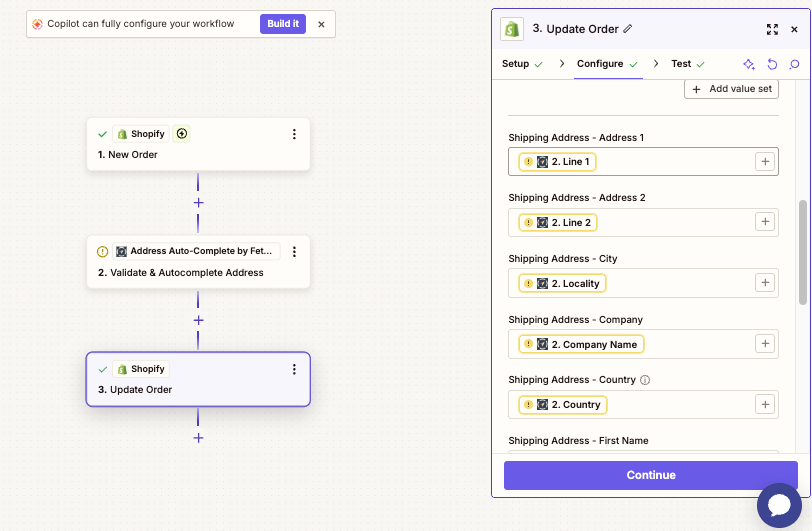
Example of mapping Fetchify's cleaned address outputs into the next step (such as Update Order):
Common Use Cases
- Standardise addresses captured from web forms before storing in a CRM
- Validate shipping addresses from ecommerce checkouts
- Enrich address records during data import workflows
- Route orders based on confirmed locality or administrative area
FAQ
Is there a free tier? The Zapier integration is free to set up. To run live lookups you need a Fetchify account with available credits. A free trial is available at fetchify.com.
Which countries are supported? Fetchify supports address lookup for a wide range of countries worldwide. Pass the relevant country code in the Country Code field.
Do I need developer access? No. The Fetchify Zapier app is available directly at zapier.com/apps/address-autocomplete-by-fetchify/integrations with no code or CLI setup required.
Where do I find my access token? Log in to your Fetchify account at account.fetchify.com and copy your API key from the dashboard.