Bank Validation
For any integration, there are two pieces of JavaScript that you need: our JavaScript library and some configuration code. See the tutorial for more details on how to add this code to the page containing your address form.
JavaScript Library
Link to the JavaScript library:
<script src="https://cc-cdn.com/generic/scripts/v1/cc_c2a.min.js"></script>There are two options for adding the JavaScript library:
Firstly, we host the final, compacted code on a CDN. This means that to add the JavaScript library to your page, you simply need to include this link. We recommend that you use this option, as you will automatically receive updates and bug fixes. However, if you use subresource integrity checks, these will fail after an update.
Alternatively, you can download the JavaScript and host it on your own server. You can download the package here from Github.
Setup
The first step is to initialize the library and complete a setup, so that you can add forms to it.
window.cc_c2a = new clickToAddress({
	accessToken: 'xxxxx-xxxxx-xxxxx-xxxxx' // Replace this with your access token
})
Tips
This call can only be performed once on every page; please call it only once during page load.
Add Bank Validation
Adding bank validation is now quite simple, simply let the library know that there's a new form to be validated.
window.cc_c2a.addBankVerify({
    sort_code: '#sortCode',
    account_number: '#accountNumber'
})| Key | Type | Required | Description |
|---|---|---|---|
sort_code | string | ✔️ | The field for the sort code. Accepts a valid query selector, the id of a field or an HTML element. |
account_number | string | ✔️ | The field for the account number. Accepts a valid query selector, the id of a field or an HTML element. |
Remove Bank Validation
You can remove bank validation from any field using the .removeBankVerify() function. Accepts a valid query selector, the ID of a field, or an HTML element.
window.cc_c2a.removeBankVerify('#sortCode');You do not need to call the function on both the sort code field and the account number field, either one will remove bank validation from both fields.
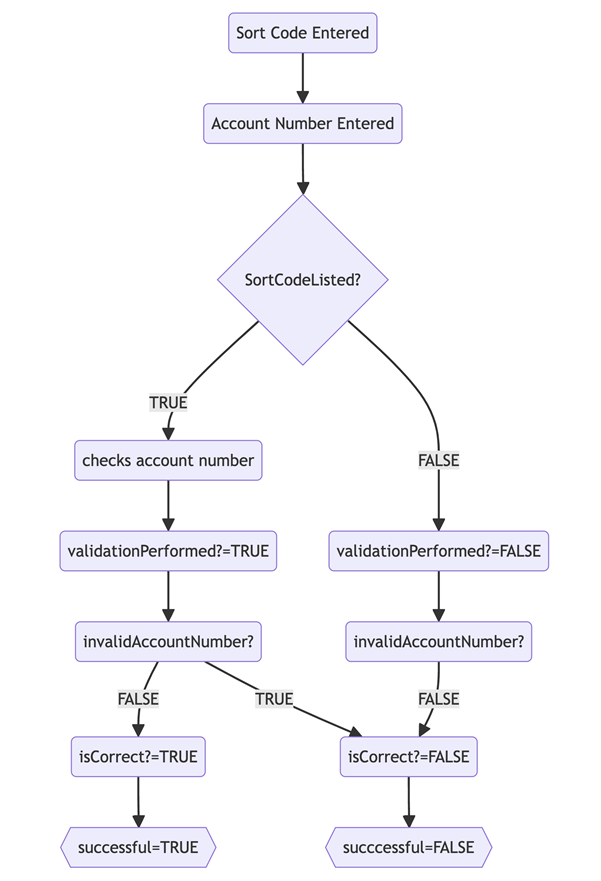
Bank Validation Process
The flowchart below shows our bank validation process: